
How to Check Lithium Battery Health at Home
Table of Contents
- Quick Answer: The 4 Home Battery Health Tests
- What You Need: Tools and Safe Setup
- Test 1: Resting Voltage With a Multimeter
- Test 2: Timed Capacity Test Under a Known Load
- Test 3: Reading Your Smart BMS App
- Test 4: Voltage Sag Under Load (Internal Resistance, Simplified)
- The Verdict: Putting Your Test Results Together
- Keep a Battery Health Log: Why Trends Beat Single Readings
- When to Call a Professional
- Frequently Asked Questions
- Conclusion
Introduction
Is your lithium battery dying, or are you just imagining it? Backup time feels shorter than last year. The inverter shuts off earlier during load shedding. You’re wondering whether the battery needs replacing — but batteries are expensive, and you don’t want to throw away a good one.
Here’s the good news: you don’t need an engineer or a workshop to get a reliable answer. With a basic multimeter, a known load, and (if your battery has one) a free phone app, you can measure your battery’s real health at home and interpret the results yourself.
This guide goes beyond the quick look-feel-smell checks — if you want that fast version, see our 10-minute battery health checklist in the battery mistakes guide. Below is the deep version: four actual diagnostic tests, the voltage tables and formulas to interpret them, and a clear verdict framework so you know whether your battery is healthy, aging, ready for replacement, or unsafe.
Quick Answer: The 4 Home Battery Health Tests
Short on time? These are the four tests, in order of effort:
- Resting voltage test — let the battery sit unused for 30+ minutes, measure voltage with a multimeter, and compare it to the LiFePO4 voltage table below. Tells you the state of charge and whether the battery reaches full.
- Timed capacity test — fully charge the battery, run a known load, time how long it lasts, and calculate actual capacity (amps × hours). This is the most honest measure of remaining health.
- BMS app reading — if your battery has Bluetooth, the app shows individual cell voltages, temperature, and cycle count. A cell-to-cell gap above 50–100 mV near full charge means imbalance.
- Voltage sag test — compare voltage at rest vs. under a heavy load. Excessive sag suggests rising internal resistance — an aging battery.
Each test answers a different question. Together, they give you a verdict you can trust.
What You Need: Tools and Safe Setup
You probably already own most of this:
- A digital multimeter. A basic one costs roughly PKR 800–2,000 at any electronics market in Pakistan (as of October 2026 — prices vary). You only need the DC voltage setting.
- A known, steady load. For a capacity test, you need something that draws a predictable current: an incandescent bulb, a DC fan, a heater on low — anything with a known wattage. Your inverter’s display showing watts works too.
- A clock or timer. Your phone is fine.
- Your battery’s phone app (if it has Bluetooth BMS). Download it before you start testing.
- Pen and paper or a notes app. Write down every reading. Memory is unreliable; a written log is the whole point.
Safety ground rules — read these first:
- Never open a sealed battery pack. All the tests here are done from the outside terminals or the app.
- Do not test a battery that is swollen, leaking, cracked, smoking, or unusually hot. Treat it as unsafe, disconnect it if you safely can, keep it away from flammable materials, and contact your supplier or a qualified technician.
- Never short-circuit the terminals — keep metal tools, jewelry, and stray wires away.
- Don’t run a capacity test past the battery’s low-voltage cutoff. When the inverter shuts off or the voltage hits the cutoff range, the test is over.
- If your multimeter shows 0V across the terminals, the battery may not be dead — the BMS may have disconnected output after deep discharge (sleep mode). Try waking it with your approved lithium charger before concluding anything, and check the manufacturer’s instructions.
Test 1: Resting Voltage With a Multimeter
This is the simplest test and the right starting point. Voltage tells you the battery’s state of charge (SoC) — roughly how full it is — when measured at rest.
Why “at rest” matters. A battery fresh off the charger reads artificially high (surface charge), and one under load reads artificially low. For an honest reading, disconnect all loads and chargers and let the battery sit for at least 30 minutes. Ideally a few hours; some manufacturers suggest up to 4 hours for the most accurate reading. Be consistent — use the same rest time each time you test so your readings are comparable.
How to measure:
- Set your multimeter to DC volts (the “V” with straight lines, not the wavy one).
- Choose a range above your battery voltage — the 20V range for a 12V battery, 200V for 24V/48V systems.
- Touch the red probe to the positive (+) terminal and the black probe to the negative (−) terminal.
- Read the voltage and compare it with the table below.
LiFePO4 resting voltage table (approximate)
LiFePO4 has a famously flat discharge curve — a single cell holds roughly 3.2V across most of its charge range — so voltage alone can’t pin down the exact middle percentages precisely. The ends of the curve are where voltage tells you the most. Values vary slightly by manufacturer and temperature; always defer to your battery’s datasheet.
| State of charge (approx.) | |||
|---|---|---|---|
| 12V battery (4 cells) | 24V battery (8 cells) | 48V battery (16 cells) | |
| 100% (rested after charging) | 13.6 V | 27.2 V | 54.4 V |
| 90% | 13.4 V | 26.8 V | 53.6 V |
| 80% | 13.3 V | 26.6 V | 53.1 V |
| 60% | 13.1 V | 26.2 V | 52.3 V |
| 50% | 13.0 V | 26.0 V | 52.0 V |
| 40% | 12.9 V | 25.8 V | 51.5 V |
| 30% | 12.8 V | 25.6 V | 51.2 V |
| 20% | 12.8 V | 25.6 V | 51.2 V |
| 10% | 12.0 V | 24.0 V | 48.0 V |
| 0% (BMS cutoff) | 10.0 V | 20.0 V | 40.0 V |
Compiled from manufacturer and industry voltage references; treat mid-range values as approximate. Right after charging, a 12V battery may briefly read 14.4–14.6V before settling back toward 13.4–13.6V at rest.
What this test tells you:
- A fully charged battery that never reaches ~13.4–13.6V (12V system) at rest may not be charging fully — check your charger settings, or the battery may have lost top-end capacity.
- A battery that reads 12.0V or below at “full charge” rest is seriously degraded or deeply imbalanced.
- A healthy battery holds its resting voltage steady. If it self-discharges noticeably over a few days with nothing connected (beyond the BMS’s tiny standby draw), that’s a warning sign.
The NMC caveat. This table is for LiFePO4 — the chemistry in most Pakistani solar batteries. NMC lithium batteries (common in some UPS units and power stations) have a wider, steeper voltage curve, so the same voltages mean different charge levels. If your battery isn’t LiFePO4, find the voltage chart for your specific chemistry and model.
Test 2: Timed Capacity Test Under a Known Load
This is the gold-standard home test. Voltage tells you how full the battery is; a capacity test tells you how big the tank has become — and the tank shrinks as batteries age.
The formula is simple:
Capacity (Ah) = Current (A) × Time (h)
A 100Ah battery delivering 10 amps should last 10 hours. If it only lasts 7, you have roughly 70Ah left — 70% of rated capacity.
Step by step:
- Fully charge the battery. Let it complete a full charge cycle until the charger indicates full.
- Disconnect the charger. Let the battery rest briefly (15–30 minutes).
- Connect a known, steady load. Examples: a 100W bulb through your inverter, or a DC load of known current. Note the current or wattage. For a 12V system, watts ÷ 12 ≈ amps (roughly; use your inverter’s watt display if it has one).
- Start the timer and record the start voltage.
- Let it run. Check periodically. Do not leave it completely unattended for long stretches — check every 30–60 minutes.
- Stop when the battery reaches its low-voltage cutoff — the inverter shuts off, or voltage approaches ~10V on a 12V system (~20V/24V, ~40V/48V). Do not force it lower.
- Calculate: multiply the average current by the hours elapsed. Compare with the rated capacity on the battery label.
Worked example. A 12V 100Ah battery, fully charged, runs a 120W load. The inverter shows roughly 10A draw. It lasts 7.5 hours before cutoff. Actual capacity = 10A × 7.5h = 75Ah → 75% of rated. That’s an aging but usable battery (see the verdict table below).
The load-shedding shortcut. In Pakistan, you may not need an artificial test at all. Your home already runs a real-world capacity test every time the power goes out. Note your typical load (the inverter display shows watts) and time how long the battery lasts from full charge to cutoff. Compare with how long it lasted when the battery was new — or with the rated runtime. A battery that used to carry your home through a 3-hour outage and now dies at 90 minutes has lost roughly half its usable capacity. Just remember: the load must be similar both times for a fair comparison.
Important notes:
- Keep the load modest — around 0.1C to 0.2C (10–20A for a 100Ah battery) is ideal. Very heavy loads make the result worse than reality because of voltage sag, and very light loads make the test take all day.
- Temperature matters. A battery tested on a cool evening will show slightly less capacity than the same battery on a warm afternoon. Note the conditions.
- One full test cycle is enough for a health check. Don’t repeat deep discharge tests frequently — each full cycle costs a little life. Our battery lifespan tips explain how to make every cycle count.
Test 3: Reading Your Smart BMS App
If your battery has a Bluetooth-enabled BMS, you own a diagnostic instrument — most owners never look at it. The app shows what the battery management system sees: individual cell voltages, temperatures, current, and cycle count. Here’s what each number means and what to look for.
Getting connected. Download the app your battery’s seller or manufacturer recommends (common ones include the Xiaoxiang/BMS apps and brand-specific apps). Enable Bluetooth, stand near the battery, and pair. If the app shows no device, the battery may be in sleep mode — wake it by starting a charge cycle.
What to check, in order of importance:
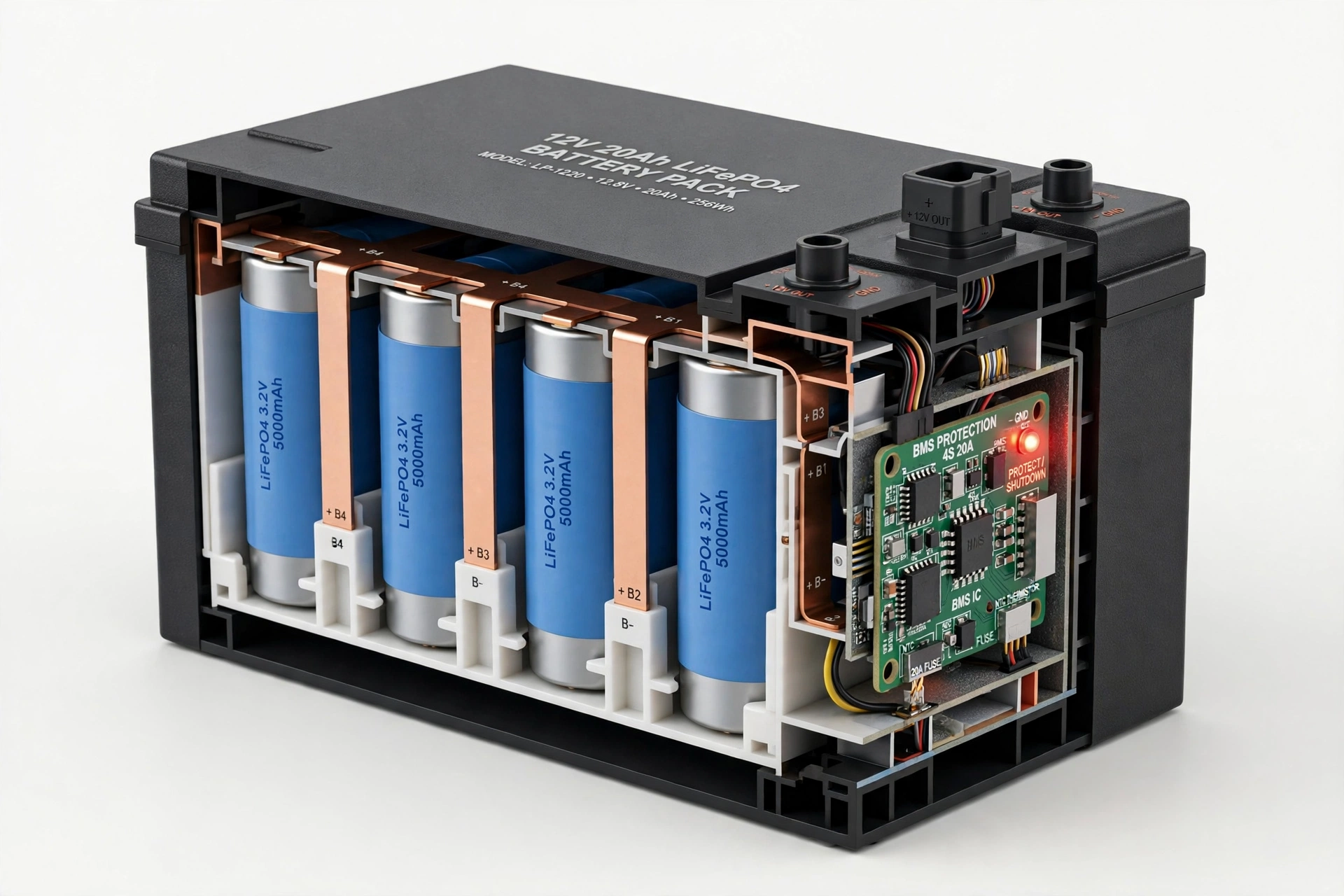
- Individual cell voltages. This is the single most valuable screen. A 12V LiFePO4 pack has 4 cells; 24V has 8; 48V has 16. Look at the spread between the highest and lowest cell.
- Under ~50 mV (0.05V) difference near full charge: healthy balance.
- 50–100 mV: mild imbalance. Often correctable — a full charge cycle lets the BMS balance the cells (balancing usually happens near the top of charge).
- Over 100 mV near full charge: significant imbalance. One cell is much weaker than the rest. The weak cell hits empty first and full first, so the whole pack behaves like its worst cell.
- Track this monthly. A gap that grows over successive months points to a degrading cell.
- Pack voltage and current. Confirm the total matches roughly the sum of cells, and that charge/discharge current readings look sane when loads run.
- Temperature. Check cell temperatures during charging on a hot afternoon. Sustained readings above ~45°C during charging mean your installation spot is too hot — see our heat guide for what to do.
- Cycle count. Most apps show total full-equivalent cycles. Compare against the battery’s rated cycle life — quality LiFePO4 packs are typically rated for several thousand cycles (often 3,000–8,000 depending on the model; check your datasheet). A battery at 4,000 of 6,000 rated cycles with 75% capacity remaining is behaving normally — it’s aging, not failing.
- SOC % reading. Take the app’s state-of-charge percentage with a grain of salt — it’s an estimate, and it drifts. Trust your timed capacity test over the app’s percentage.
- Protection/mosfet status. If the app shows charge or discharge “off” or a protection triggered (over-voltage, under-voltage, over-temperature, short circuit), note which one. Frequent temperature or voltage protections are diagnostic clues, not nuisances.
What if your battery has no Bluetooth? Many budget batteries don’t. You’re not locked out of diagnostics — Tests 1, 2, and 4 still work fine. But the next time you buy a battery, treat a smart BMS with an app as a genuinely valuable feature, not a gimmick. Our buying guide covers what else to look for.
Test 4: Voltage Sag Under Load (Internal Resistance, Simplified)
As batteries age, their internal resistance rises. You can’t see resistance directly, but you can see its symptom: voltage sag — the voltage dips when a heavy load kicks in and recovers when the load stops.
The simple version (no math):
- Measure resting voltage with everything off. Note it.
- Switch on your heaviest normal load (air conditioner, water pump, microwave — whatever your inverter handles).
- Watch the voltage over 30–60 seconds. Note the lowest reading.
- Switch the load off and watch the voltage recover.
Interpreting the sag (12V system; scale proportionally for 24V/48V):
| Sag under heavy load | What it suggests |
|---|---|
| Drops less than ~0.3V, recovers in seconds | Healthy — low internal resistance |
| Drops 0.3–0.6V, recovers steadily | Normal aging — keep an eye on it |
| Drops more than ~0.6–0.8V, or recovers slowly | High internal resistance — degraded battery |
| Voltage collapses and inverter trips on a load it used to handle | Failing — plan replacement |
These are practical rules of thumb for typical home solar batteries, not laboratory thresholds. “Heavy load” means something substantial — a phone charger won’t tell you anything.
The math version (optional). If you like numbers: internal resistance ≈ voltage drop ÷ current. Example: a 12V battery sags 0.5V when a 50A load starts → roughly 0.5 ÷ 50 = 0.01 ohm (10 milliohms). You can’t easily compare this to a universal “good” number because it varies by battery size and design — what matters is the trend. Measure the same way every few months; a steadily rising sag means steadily rising resistance.
One caution: don’t confuse battery sag with wiring problems. Thin, long, or loose cables also cause voltage drop. If the sag is large, first check that terminals are clean and tight and cables are adequately sized — then blame the battery.
The Verdict: Putting Your Test Results Together
No single test tells the whole story. Combine your results:
| Good | Aging (monitor) | Replace soon | Stop using now | |
|---|---|---|---|---|
| Capacity test | 90–100% of rated | 70–90% of rated | Below ~70% of rated | — |
| Resting voltage (full) | Reaches table values | Slightly low | Well below table values | 0V with no BMS wake-up |
| Cell imbalance (BMS app) | <50 mV | 50–100 mV | >100 mV and growing | One cell at 0V or wildly off |
| Physical signs | None | None | Warm during normal use | Swelling, leaking, smell, extreme heat |
How to read this:
- Good across the board: your battery is healthy. Re-test every 6–12 months.
- Mostly “aging”: the battery is wearing normally. Shorten your re-test interval to every 2–3 months, reduce heavy loads where you can, and start budgeting for a replacement in the next year or two.
- Any “replace soon”: start planning the replacement now — check our buying guide and the lifespan guide to understand what to expect from the next battery.
- Any “stop using now”: disconnect the battery if you safely can, don’t charge it, keep it away from flammable materials, and contact your supplier or a qualified technician. A swollen, leaking, or extremely hot battery is a safety issue, not a maintenance project.
A note on honesty: a battery at 75% capacity isn’t “bad” — it’s a battery that still works but holds less. Plenty of Pakistani homes run fine on aging batteries for years, as long as the loads are matched to what’s actually there. The tests tell you the truth; what you do with it depends on your needs and budget.
Keep a Battery Health Log: Why Trends Beat Single Readings
One measurement is a snapshot; a series of measurements is a story. A battery that reads 13.2V today tells you little. A battery that read 13.5V six months ago, 13.4V three months ago, and 13.2V today is telling you it’s fading — and you can see the pace.
Keep it simple. A notebook page or phone note with columns:
Date | Resting voltage (full) | Capacity test result | Cell imbalance (mV) | Sag under load | Notes (temperature, load)
Update it every 2–3 months, or after every summer — heat is the main aging accelerator in Pakistan, so a post-September entry each year is the most valuable one you can make. If you ever need warranty support or a technician’s opinion, this log is the first thing they’ll ask for, and the best evidence you can hand them.
When to Call a Professional
Home tests handle diagnosis. They don’t handle repair. Call your battery supplier or a qualified technician when:
- The battery is swollen, leaking, cracked, smoking, or extremely hot — treat as urgent, not as a DIY project.
- The BMS app shows a dead cell (0V) or a protection that won’t clear after a proper charge cycle.
- The battery reads 0V at the terminals and won’t wake with the approved charger.
- Capacity has dropped below ~70% and you need a professional assessment of whether the pack can be serviced or must be replaced.
- You’re unsure about anything involving opening the pack, replacing cells, or resetting the BMS. Sealed packs are not user-serviceable — opening one voids the warranty and risks short circuits.
A good technician will run the same kinds of tests you just did, plus a few you can’t do at home (like per-cell internal resistance with proper equipment). Your home test results and log make their job faster — and protect you from paying for a replacement you don’t need.
Frequently Asked Questions
How do I know if my lithium battery is still good?
Run a timed capacity test: fully charge it, run a known load, and calculate actual amp-hours (current × time). If it delivers 90% or more of its rated capacity, it’s healthy. 70–90% means normal aging. Below ~70%, start planning a replacement. Resting voltage and BMS cell-balance readings confirm the picture.
Can a multimeter tell me my battery’s exact percentage?
Not precisely. LiFePO4’s voltage curve is very flat through the middle — roughly 3.2V per cell from about 20% to 80% charge — so a multimeter reading can’t distinguish 40% from 60% reliably. Voltage is accurate near the top and bottom of the range. For exact percentages, use the battery’s BMS app or a shunt-based battery monitor.
What voltage should a 12V lithium battery read when fully charged?
Right after charging, up to about 14.4–14.6V; after resting 30+ minutes, it settles to roughly 13.4–13.6V. If your rested battery never gets above about 13.2V after a full charge, it’s either not charging fully or has lost top-end capacity.
How often should I test my battery’s health?
Every 6–12 months for a healthy battery, every 2–3 months once you notice aging signs, and once after each summer in Pakistan — heat does most of the year’s aging. Always use the same test conditions so results are comparable.
Why does my battery show 0V? Is it dead?
Not necessarily. The BMS disconnects the output when cells drop too low or after long storage (sleep mode), and the terminals then read 0V while the cells inside are fine. Try waking it with your approved lithium charger and check the manufacturer’s instructions. If it won’t wake, contact your supplier.
My BMS app shows one cell lower than the others. Is that bad?
A small gap (under ~50 mV) near full charge is normal. 50–100 mV suggests mild imbalance — a full charge cycle usually lets the BMS balance it out. Over 100 mV, or a gap that keeps growing month after month, points to a weakening cell. The pack can only perform as well as its worst cell.
Does load shedding runtime really work as a health test?
Yes — it’s a genuine real-world capacity test, as long as the load is similar each time. Note the wattage on your inverter display and time the outage from full charge to cutoff. If the same load that once ran 3 hours now runs 90 minutes, you’ve lost roughly half your usable capacity. It’s less precise than a controlled test but far more convenient.
Should I replace my battery at 70% capacity?
Not automatically. A battery at 70% still works — it just holds less. Replace it when it no longer meets your needs (can’t cover your outage loads), when imbalance keeps growing, or when any safety warning appears. Many homes run aging batteries for years by matching loads to actual capacity. Budget for the replacement, but don’t rush a working battery to the recycler.
Conclusion
Checking lithium battery health at home comes down to four tests: resting voltage against the table, a timed capacity run with the simple amps-times-hours formula, a look at your BMS app’s cell voltages, and watching how the voltage behaves under load. None of them needs special equipment, and together they answer the only question that matters: is this battery healthy, aging, or done?
Do the tests, write down the numbers, and repeat them after summer. That small habit will tell you more about your battery than any single reading ever could — and it’ll make sure you replace it when it actually needs replacing, not a year too early out of anxiety or a year too late out of hope.
If your tests say the battery is on its way out, read our 2026 buying guide before shopping, and if you’re weighing a switch from older technology, our lithium vs lead-acid comparison lays out the real-world tradeoffs. To understand what’s happening inside the cells as they age, the ultimate guide to how lithium batteries work explains it in plain language.
Sources & Further Reading
- LiTime — LiFePO4 Voltage Table: 12V, 24V, 36V, 48V (resting voltage vs. state of charge, multimeter method)
- Jackery — Ultimate Guide to LiFePO4 Voltage Chart (voltage charts, rest-time guidance)
- ACE Battery — How to Test Lithium Battery Capacity (capacity formula, test methods, results interpretation)
- AYAA Tech — How to Test Golf Cart Battery Health? (BMS telemetry, cell imbalance thresholds, 0V sleep mode)
- CandlePowerForums — How to Measure Internal Resistance With a Digital Multimeter (voltage-drop resistance method)
Last updated: October 2026. Battery specifications and prices change over time — always verify your battery’s datasheet and current pricing before purchasing.